
If you run an Uber/Lyft fleet, Taxi company, or Transit Media Business, you know the struggle: How do you monetize your vehicles beyond fares? How do you make Ads Feel valuable (not annoying) to riders? And how do you manage hundreds of screens without a huge team?
Enter Adhaiwell’s Taxi Car Seat Android LCD Advertising Screen—a tool that turns your cars into mobile ad powerhouses. Let’s break down why this isn’t just another screen, but a game-changer for your bottom line.
What Is Sepine’s Taxi Car Seat Android LCD Ad Screen? (Spoiler: It’s Not Just a Display)
Let’s start with the basics—because knowing what you’re investing in is key to confidence.
Sepine LCD Screen is a 10.1-inch IPS none touch-enabled LCD Display built specifically for Taxis, Uber/Lyft rides, and Buses. It mounts right on seat heads (so riders can’t miss it) and runs on Android 11.0—think of it as a smart, portable ad platform that moves with your fleet.
Here’s what makes it stand out from cheap generic screens:
- Crisp, rider-friendly visuals: 1280×800 resolution, 300cd/m² brightness (works even in sunny cars!), and 800:1 contrast—no blurry ads here.
- Reliable hardware: A quad-core RK3566 processor (keeps ads running smoothly), 2GB RAM + 16GB storage.
- All the connections you need: WIFI, 4G (SIM slots!), and USB—so updating ads is never a hassle.
But here’s the kicker: It’s not just a screen. It’s a Complete mobile ad & Media solution—and we’ll show you how to use it next.
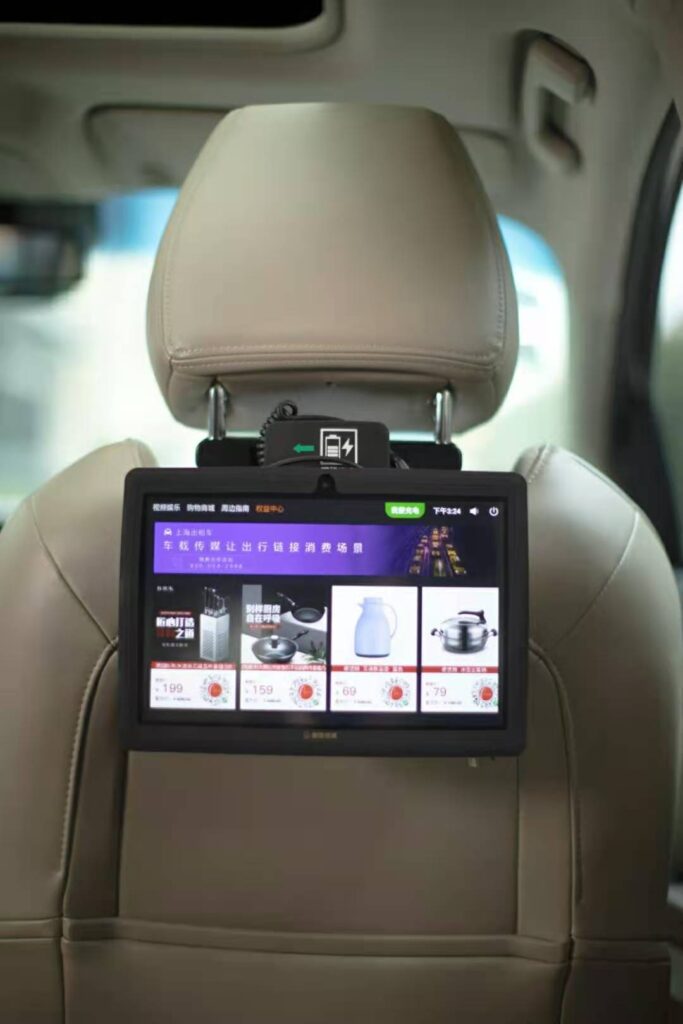
How Does This Android LCD Ad Screen Work? (8-Step Setup + 3-Click Management)
We get it—you don’t have time for complicated tech. Adhaiwell built this with busy fleet managers in mind, so “how to use it” is simple:
Step 1: Install It in 10 Minutes (Without Tech Degree )
Forget hiring installers. The screen comes with Everything you need: Car charger, an adjustable mount, and a user manual. Here’s the quick version:
1. Slide the retaining ring onto your seat headrest pole.
2. Attach the hoop to the ring, then clip it to the LCD Screen’s base.
3. Screw the LCD Screen into the base, adjust the angle (up/down, forward/back), and plug in the car charger.
Done. Your first ad-ready screen is live.
Step 2: Manage Ads Remotely (No More Visiting Every Car)
The biggest pain for transit media companies? Updating ads on 50+ cars. sepine fixes this with Free Remote CMS Software—a dashboard you can access from your laptop or phone.
Here’s how easy it is:
- Upload ads (Videos: MP4/AVI; Images: JPG/PNG; audio: MP3) with a drag-and-drop.
- Schedule when ads run: Want coffee shop ads to play 7–9 AM? Or airport hotel ads near terminals? Set it and forget it.
No more driving to every vehicle. No more waiting for drivers to update screens. Just click, schedule, and watch ads go live.
Step 2: Manage Ads Remotely (No More Visiting Every Car)
The biggest pain for transit media companies? Updating ads on 50+ cars. Adhaiwell fixes this with Free Remote CMS Software—a dashboard you can access from your laptop or phone.
Here’s how easy it is:
- Upload ads (Videos: MP4/AVI; Images: JPG/PNG; audio: MP3) with a drag-and-drop.
- Schedule when ads run: Want coffee shop ads to play 7–9 AM? Or airport hotel ads near terminals? Set it and forget it.
No more driving to every vehicle. No more waiting for drivers to update screens. Just click, schedule, and watch ads go live.